If you are an Inside Access subscriber, you can update your payment information on the Customer portal:
1. Log in to the Real Time platform at rt.smbtraining.com using your email address and password.
2. Go to the top-right corner of the page and click on your name.

3. Select Manage Subscription from the menu.
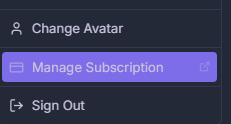
4. You’ll be redirected to a Stripe page. Enter your email address, and you’ll receive an email with a secure link to the Customer Portal, where you can:
- Cancel your subscription
- Update your credit card information
- Download invoices
If you are an Options Tribe subscriber, please reach out to support@smbcap.com to update your credit card information.
Was this article helpful?
That’s Great!
Thank you for your feedback
Sorry! We couldn't be helpful
Thank you for your feedback
Feedback sent
We appreciate your effort and will try to fix the article