To cancel your SMB Inside Access subscription, please follow these steps to access the customer portal:
1. Log in to the Real Time platform at rt.smbtraining.com using your email address and password.
2. Go to the top-right corner of the page and click on your name.

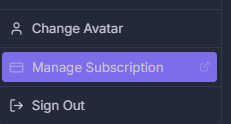
4. You’ll be redirected to a Stripe page. Enter your email address, and you’ll receive an email with a secure link to the Customer Portal, where you can:
- Cancel your subscription
- Update your credit card information
- Download invoices
If you don't find your customer portal, please reach out directly to our support team at support@smbcap.com.
Important: No refunds are issued
Once your next billing cycle starts, the charge cannot be reversed. Make sure to cancel before your renewal date to avoid being billed for the following month. If you are unsure when your next billing date is, you can check it in the billing section of the Real Time platform before completing the cancellation steps above.
Was this article helpful?
That’s Great!
Thank you for your feedback
Sorry! We couldn't be helpful
Thank you for your feedback
Feedback sent
We appreciate your effort and will try to fix the article